How AI Birthday Cards Can Feel Designed, Not Generated
AI can create a birthday card in seconds. But generating an image and designing a birthday invitation are not quite the same thing.
A good AI birthday card needs more than attractive colours, realistic lighting and decorative elements. It needs a clear visual direction, readable information, appropriate composition and a style that matches the person celebrating.
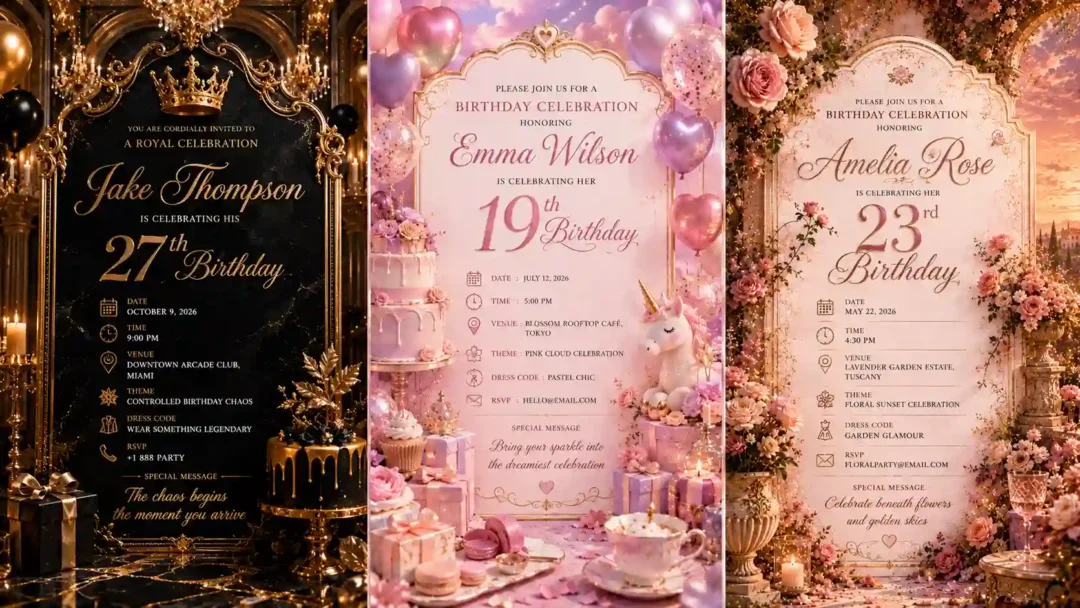
I created these birthday invitation concepts using ChatGPT image generation, exploring different creative directions rather than starting with conventional birthday templates.
The six approaches in this guide cover royal black and gold, dreamy pastel, fantasy castle, editorial minimalism, chaotic luxury and floral garden aesthetics.
You can use the same prompts with other AI image-generation tools, including Flux, Midjourney, Leonardo AI and Nano Banana, and compare how each platform interprets the same creative direction.
The goal is simple: use AI to explore the visual idea, then make deliberate design decisions instead of accepting the first generated image.
What Are AI Birthday Cards?
AI birthday cards are digital birthday invitations or greeting-card designs created with artificial intelligence image-generation tools.
Instead of starting with a fixed template, you describe the desired visual style, atmosphere, composition and event details in a prompt. The AI model then generates an image based on that description.
This makes it possible to create birthday cards around very specific themes, including:
- Luxury birthday invitations
- Cinematic birthday cards
- Fantasy birthday invitations
- Minimalist birthday cards
- Floral birthday invitations
- Pastel birthday designs
- Funny or meme-style birthday invitations
- Personalised birthday invitations
How Do You Make an AI Birthday Card Look Designed?
The easiest mistake is to focus entirely on adding more detail to the prompt. More detail doesn’t automatically create better design.
When creating an AI birthday invitation, pay attention to five things.
Visual Hierarchy
The birthday person’s name and age should have a clear visual position. The date, time, venue and RSVP information should remain easy to find.
Lighting
Lighting establishes mood and can direct attention toward important parts of the composition.
Composition
Decorative elements should support the central idea rather than compete with the invitation information.
Negative Space
AI often wants to fill the canvas. Design doesn’t. Empty space gives important information somewhere to breathe.
Personality
A 19th birthday doesn’t necessarily need to look like a 50th birthday. A formal evening celebration shouldn’t automatically use the same visual language as a casual outdoor party.
Replace the Details Inside the Brackets
Replace the information inside these brackets with your own invitation details:
- [NAME]
- [AGE]
- [DATE]
- [TIME]
- [VENUE]
- [DRESS CODE]
- [RSVP]
- [SPECIAL MESSAGE]
- [AR]
The prompts are designed to be reusable. Change the personal information while keeping the overall creative direction intact.
Birthday Cards AI Prompts

Royal Black & Gold Birthday Invitation
Replace the highlighted text with your own details before you run the prompt.

Dreamy Pastel Luxury Birthday Card
Replace the highlighted text with your own details before you run the prompt.

Fantasy Castle Birthday Invitation
Replace the highlighted text with your own details before you run the prompt.

Editorial Minimal Luxury Invitation
Replace the highlighted text with your own details before you run the prompt.

Chaotic Luxury Meme Birthday Invitation
Replace the highlighted text with your own details before you run the prompt.

Floral Garden Sunset Invitation
Replace the highlighted text with your own details before you run the prompt.
Which AI Tools Can Create Birthday Cards?
ChatGPT
I used ChatGPT image generation to create the concepts in this article. It is particularly convenient when you want to develop the creative idea and generate the image within the same conversation.Flux
Flux can be used to explore alternative interpretations of detailed visual descriptions and creative directions.Midjourney
Midjourney is another option for creating highly stylised birthday invitation concepts and experimenting with artistic aesthetics.Leonardo AI
Leonardo AI can be used for exploring different image-generation workflows and visual styles.Nano Banana
Nano Banana can be used for image-generation and image-editing workflows, making it another option for experimenting with birthday invitation concepts.The same prompt can produce noticeably different results across models. That makes cross-tool comparison useful when you’re trying to find a particular visual treatment rather than simply looking for the “best” AI image generator.How to Create a Personalized Birthday Card with AI
A personalized birthday card needs more than a person’s name. Start with the event itself.- The person’s age
- Their personality
- The type of celebration
- The venue
- The time of day
- The dress code
- The preferred colours
- The overall mood
- The message you want the invitation to communicate
How to Use These Birthday Card Prompts
Step 1: Choose a Visual Direction
Pick the concept that best matches the birthday.Step 2: Replace the Bracketed Information
Add the actual name, age, date, time, venue and other details.Step 3: Generate the First Version
Use the complete prompt in your chosen AI image-generation tool.Step 4: Review the Composition
Look at the generated image as an invitation rather than simply an AI image. Check whether the important information is visible and whether the visual style fits the event.Step 5: Refine the Design
If something isn’t working, identify the specific problem before changing the creative direction.Step 6: Prepare the Final Version
Before sharing or printing the invitation, check names, dates, times, venue information and RSVP details carefully. AI-generated typography and small text can require additional attention.Where Can You Use AI Birthday Cards?
Instagram Stories
Create a vertical version with the main birthday information immediately visible.WhatsApp Invitations
Keep the person’s name, birthday and event information readable at smaller image sizes.Printable Invitations
Check dimensions, resolution, margins and typography before sending the final artwork for printing.Birthday Event Branding
A successful visual direction can also be extended to posters, welcome signs, menus, social media graphics and other event materials.Final Thoughts
The easiest way to use an AI birthday card prompt is to copy it, change the name and accept the first result. That’s also how you end up with something that feels generic.A better approach is to treat the prompt as the beginning of the design process.Choose the visual direction. Generate the first version. Study what works. Identify what doesn’t. Refine the direction. Then decide whether the final image actually feels right for the person and the occasion.AI makes the production process faster, but design still comes from making choices.The goal isn’t to make a birthday card that looks like it was generated by AI. The goal is to make one that feels like someone had a reason for every important visual decision.AI generates the possibilities. Design decides which one is worth keeping.About Author

Manas Ranjan Behera
More in AI Graphic Design Prompts
This guide is part of our AI Graphic Design Prompts hub, where you’ll find every related guide, along with tips and common questions.